
Geometry Arrow 3D
Recommend For You














.jpg "Geometry Dash Spider")
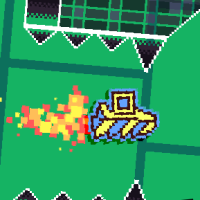





Geometry Arrow 3D is a new adventure game featuring 3D graphics. You need to guide your arrow character to fly over spike walls in four maps.
The new release of Geometry Arrow 3D
This game was inspired by Geometry Dash 3D. Officially launched as an HTML game on January 8, 2026, this new title combines the thrill of adventure with captivating visuals, allowing you to embark on exciting journeys through uncharted territories. With its rich graphics and four distinct maps, Geometry Arrow 3D promises a fresh and invigorating experience.
Playable game modes of Geometry Arrow 3D
Practice Mode
To help you refine your skills, Geometry Arrow 3D includes a carefully designed Practice Mode. By selecting the blue button on the left side of the screen, you can enter this less intense version of the game. In Practice Mode, green gems appear as checkpoints throughout the terrain. When you collide with spikes, you are instantly returned to your last checkpoint, providing a quick opportunity to continue the adventure without significant setbacks. This mode is ideal for honing reflexes and familiarizing oneself with the various obstacles present in the 3D environments.
Normal Mode
For those seeking a more perilous challenge, the game offers a Normal Mode that elevates the stakes significantly. Unlike Practice Mode, Normal Mode does not provide any checkpoints. This means that should you collide with any spikes, you will have to start over from the very beginning of the level. With no safety nets, you must navigate your arrow up and down with precision, carefully maneuvering to avoid dangerous spikes that threaten to end your journey.
How to play Geometry Arrow 3D
In this game, you need to control an arrow character to fly up or down to evade spiky walls to reach the finish line safely. There are four maps with different obstacles and paths in this game.
- Map 1: The first map introduces you to a series of spiky walls, strategically placed to challenge your navigation skills. Thankfully, there are spacious gaps between these spiky obstacles, allowing you to fly through with relative ease.
- Map 2: As you progress to the second map, the difficulty begins to ramp up significantly. This map features roofs adorned with spikes, along with long spiky traps that line the path. You must exercise caution as you navigate through this treacherous landscape, strategically flying under and over obstacles to avoid collisions.
- Map 3: The third map presents a more intricate design, featuring long paths filled with diamond-shaped blocks topped with spikes. This layout tests your ability to fly through tight spaces while continuously avoiding obstacles.
- Map 4: The final map offers the most intense challenge, featuring a path that is not only tight but also zig-zags unpredictably. You must remain alert as you navigate this convoluted route, as it tests your ability to adapt to shifting obstacles quickly.
How to control
Click the left mouse button if you want the arrow character to fly up.
Release the left mouse button if you want the arrow character to fly down.
Use the Z key to drop a green gem.
Use the X key to remove the green gem.